A search box carries a responsibility
For a long time I didn't want a search box on this site. Not because I didn't want to make it easier for readers to find a post, but because I was concerned about the responsibility it would entail. I really wanted to avoid signing up for a service, pasting an API key into my build, and sending every word that you type to somebody else's servers.
It boils down to the same preoccupation I've had with every decision concerning the architecture of "Be Useful". Do the benefits of this or that feature outweigh the practicalities of implementation, the ease of use, performance, or respecting the basic obligations for data protection? The clue is in the name.
The sentence I can stand by
This site has a privacy page. It's written in plain English (I think), where every sentence is intended to be as transparent as possible.
I invite you to go and read it. You'll notice that some sentences are hedged. The paragraph about analytics repeats what Cloudflare says it does. The paragraph about hosting says that Cloudflare acts as a data processor under its own terms. Those hedges are deliberate because I personally haven't audited Cloudflare. I've read what they publish about themselves, found it reasonable, and passed it on to you with an attribution so you can see exactly how much weight it carries.
That's a normal and unavoidable thing to do. Every site you've ever visited is doing the same thing (probably). But each hedge is a sentence I'm relaying rather than verifying, and adding more carries a fresh burden of oversight to a personal project which has no commercial value.
Case in point: adding a hosted third-party search service. Something along the lines of, according to whoever, your search terms are handled thus and retained for so long. Accurate, probably. Can I personally guarantee it? No. And it'd need re-checking every time that company changed their terms, their sub-processors, or the country the data sits in. That's a maintenance job I don't need or want for the "convenience" of a search bar.
To make a site search possible, the statement I want to share on the privacy page doesn't have "according to" in it at all. No hedging, dear reader.
How a search box normally works
The usual arrangement is that the search box is a messenger. You type some words. Perhaps it's a swearword because you're an edgelord. The words travel to a server, the server consults a database of your site's contents, and it sends back a list of matches.
That round trip is why search has traditionally needed a back end. It's also why the path of least resistance is to rent functionality from Algolia or hand the job to Google.
A site built from pages that are finished before anyone asks for them has nothing that can answer the query. A CDN takes a request for a URL and hands back the file that matches it. It never opens that file, so it has no way to answer a question about what is inside one.
How Pagefind does it instead
Pagefind is an independent open source project originally built at CloudCannon. It's not a company or a subscription. It lives in this project's development dependencies, which means it's installed on my machine and on the build server and never ships to anyone reading the site.
It runs at the end of the build, once Astro has finished turning the CMS content into HTML, and its whole job is to read that HTML and write an index next to it.
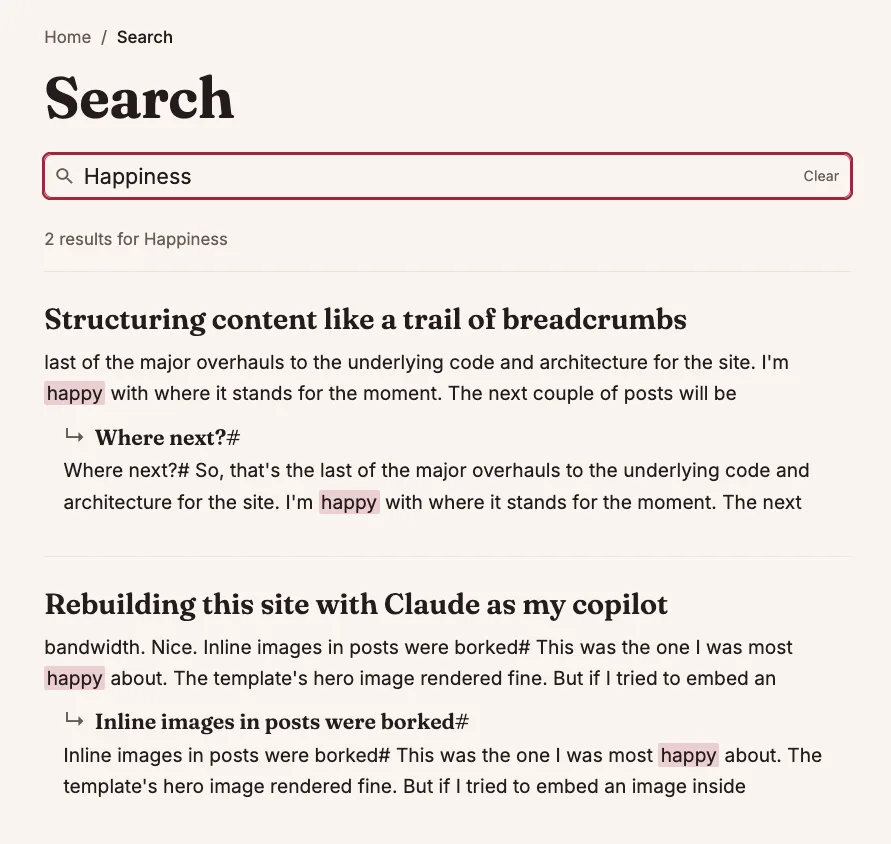
An index here means a compressed map of every word to every page it appears on. The simplest analogy is that it works like the index at the back of a reference book. Somebody compiled it in advance, it travels with the book, and you consult it yourself rather than pestering a librarian.
The index ships as ordinary static files alongside the pages. When you type in the box, your browser fetches the pieces of the index it needs and does the matching locally, using a small WebAssembly module.
Pagefind splits the index up so that a visitor downloads a fraction of it rather than the whole thing, which is what allows sites with tens of thousands of pages to work this way. Mine indexes 29 posts, so deeply inconsequential in terms of scale.
Is this site even static?
When I first wrote this post, the answer was yes, near enough. Every page was a finished file before anyone asked for it, and that's exactly what Pagefind needs, because it reads the build output and can only index HTML that exists on disk.
Since moving to Astro and Cloudflare, the answer depends on who's asking. For you, the reader, nothing has changed. Every page comes out of a cache, finished and identical for everyone. But a post is no longer a file waiting on disk when the build ends. It's rendered the first time somebody asks for it, then held in Cloudflare's cache and handed to everyone after them. When I publish a change, Contentful tells the site, and only the cached pages that don't have the change are thrown away.
Which leaves Pagefind with nothing on disk to read. So the build renders every post anyway, into a folder that's never deployed. Pagefind reads those copies, writes the index, and the folder is deleted before anything ships. Every post is rendered once for an audience of one, the indexer, and then shredded.
There is server-side code in the deployment, more of it than before. What there isn't, anywhere, is something that answers a search query. Static enough, then, for the purpose at hand.
The paragraph, and how to check it
The privacy page says that the search runs entirely in your browser, that the words you type are never sent to this site or to anyone else, and that your last search is remembered in that tab only. No attribution, no according to. Those are descriptions of a mechanism rather than assurances from a company.
You don't need to take my word for it, either. This site sends a Content Security Policy (opens in a new window) header, which is a list of rules the browser itself enforces on the page. One of those rules, connect-src, governs where the page is allowed to open a network connection. Mine is set to this domain plus the one host Cloudflare's analytics report to, and anything else is refused by the browser rather than by my good intentions. Open the network tab, type a query, and nothing goes out.
One Cloudflare host isn't zero (two, if you count the one the analytics script itself loads from), which is why the hedged paragraphs are still on that page and will stay there. Cloudflare hosts the site, so they already handle every request that reaches it, and the analytics run without cookies. What I avoided was adding another service provider, and another claim I'd have to take on trust.
The same CSP header carries a permission called wasm-unsafe-eval, which is there for one reason. Pagefind's matching runs as WebAssembly, and without that permission the browser would refuse to start it.
Any drawbacks?
There are some compromises to document, all three of them:
First, loading the search page pulls down about 120KB compressed, split between the search library at 13KB, the WebAssembly module at 60KB, and the interface components at 48KB. That's a fair chunk of code. It only loads on the search page, and every byte comes from this domain, but it's real weight.
Secondly, it needs JavaScript to work. With scripts turned off you get the page, the illustration of a magnifying glass (which is an SVG file, so it adapts to light and dark mode), and a note pointing you to the archive and the tags instead, but no working search.

Thirdly, the index is only as current as the last build. In the first version of this site, that was a real gap. Publishing a post didn't rebuild anything, so a new post could be live and linked from the home page while the search box knew nothing about it, until the next time I changed the code.
That gap has shrunk to a minute and a half. Every publish in Contentful now triggers a fresh build, and the index is written again as part of it. The post itself goes live within seconds, the build takes about 90 seconds, and for that window a search for its title comes back empty. I can live with that.
The archive, and another four ways in
Oh, and I added something else in parallel to the search function. An archive page, which lists every post grouped by year with plain titles, dates and categories in a list. I built it because the front page had grown to four pages of pagination, and reaching a post from last autumn meant clicking through all of them.
Between them, the site now has multiple ways to reach the same library of posts:
Categories indicate where a post lives.
Authors answer who wrote it, which here also means which of the two mascots is responsible.
An archive that presents the library in its entirety, all at once.
Search answers the case where you already know the word you're looking for.
Tags which help describe what a post is about.
Not one of these functions is a substitute for another, and it makes me chuckle to think that information architecture has become as exciting to me as content creation. Nerdery!
Nothing to maintain
So, to recap. "Be Useful" has a search function where there's no API key waiting to be rotated, no free tier that becomes a paid one in eighteen months, and no vendor whose terms I need to re-read every year to keep a paragraph accurate. The index rebuilds from the site's own HTML every time I publish.
I put off adding search to this site because I didn't want to layer on more responsibility than necessary for a personal site, and I assumed I'd have to make do without. What it actually took was a build step, about 120KB, and three small compromises I can accept.

retro airbrushed illustration in the style of early 1990s PC game box covers, a woman detective in a fedora and trench coat holding a large magnifying glass up to her face, the lens fills the centre of the frame and magnifies one eye, she looks directly at the viewer, warm amber key light on her face, deep midnight blue and near black background, gold and amber highlights, a single cold teal glint on the glass, saturated colour grounded in deep shadow, visible airbrush texture, smooth gradients, poster composition, high detailwritten by

Bulent Yusuf
Bulent is a content marketer by trade and writes everything here that isn't films or games (which turns out to be most of it). He doesn't think speaking about himself in the third person is the least bit weird. Born in the UK, Turkish Cypriot heritage, living in Germany.